尝试使用LangChain的Agents功能。
LangChain 官方文档的 Core components 第一项就是 Agents ,我们先来看看官方是如何介绍的 :
Agents combine language models with tools to create systems that can reason about tasks, decide which tools to use, and iteratively work towards solutions.
create_agent provides a production-ready agent implementation.
An LLM Agent runs tools in a loop to achieve a goal. An agent runs until a stop condition is met - i.e., when the model emits a final output or an iteration limit is reached.
这段话告诉我们三个信息:
Agent 是将语言模型(LLM) 与工具(Tools) 结合的系统。它的特点是具备推理能力,能自主决定该用什么工具,并通过反复迭代来解决任务。
可以使用 create_agent 函数实现
Agent 的运行是一个循环过程 :它会不断运行工具,直到满足停止条件为止。
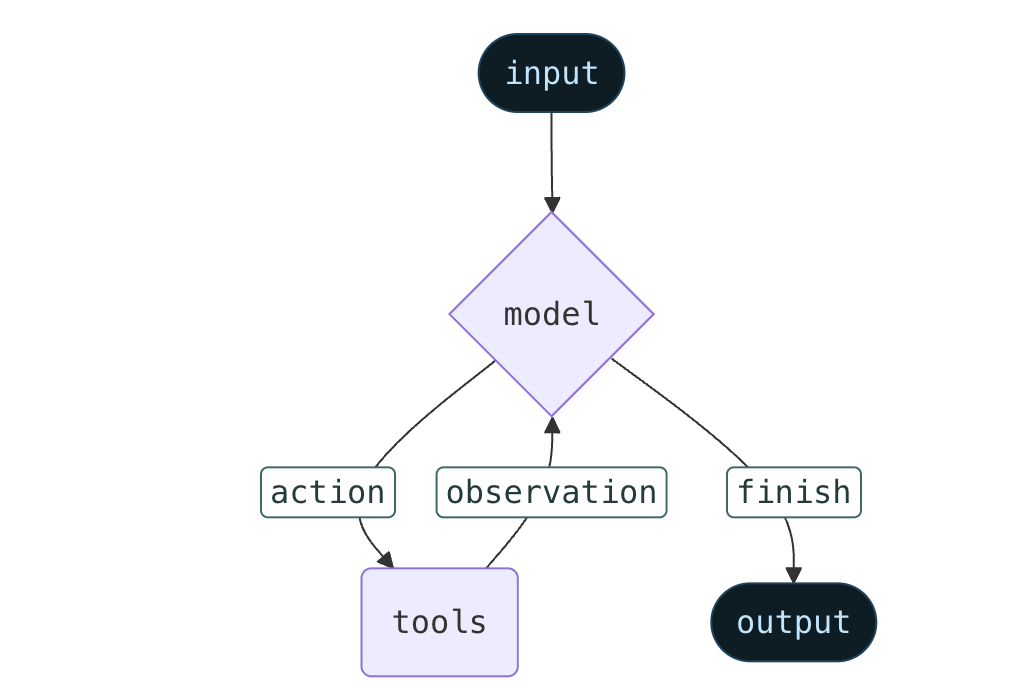
并且给出了简单的工作流程:
Model 就是 Agent 的推理引擎,负责思考、决策和生成回复。
Static Model :最常用的方式。在创建 Agent 时就固定好(例如指定用 gpt-4o),整个运行过程中不会变。Dynamic Model :一种高级用法,可以在运行时根据上下文动态选择模型。比如在简单的问题上使用便宜的模型。
Tools 就是 Agent 与外部世界交互的工具。 通常是标准的 Python 函数,加上 @tool 装饰器。根据文档的示例,我们可以通过create_agent简单定义一个 Tool :
1
2
3
4
5
6
7
8
9
10
11
12
13
14
15
from langchain.tools import toolfrom langchain.agents import create_agent@tool def search (query: str ) -> str : """Search for information.""" return f"Results for: {query} " @tool def get_weather (location: str ) -> str : """Get weather information for a location.""" return f"Weather in {location} : Sunny, 72°F" agent = create_agent(model, tools=[search, get_weather])
而如果要自定义Tool错误的处理方式,就使用 @wrap_tool_call 装饰器创建中间件:
1
2
3
4
5
6
7
8
9
10
11
12
13
14
15
16
17
18
19
20
21
22
from langchain.agents import create_agentfrom langchain.agents.middleware import wrap_tool_callfrom langchain.messages import ToolMessage@wrap_tool_call def handle_tool_errors (request, handler ): """Handle tool execution errors with custom messages.""" try : return handler(request) except Exception as e: return ToolMessage( content=f"Tool error: Please check your input and try again. ({str (e)} )" , tool_call_id=request.tool_call["id" ] ) agent = create_agent( model="gpt-4o" , tools=[search, get_weather], middleware=[handle_tool_errors] )
顾名思义,System Prompt 就是系统层面的提示词,用于设定 Agent 的行为规范和角色。
1
2
3
4
5
agent = create_agent( model, tools, system_prompt="You are a helpful assistant. Be concise and accurate." )
这是传入Str,复杂一些,可以传入LangChain的 SystemMessage
1
2
3
4
5
6
7
8
9
10
11
12
13
14
15
16
17
18
19
20
21
22
23
from langchain.agents import create_agentfrom langchain.messages import SystemMessage, HumanMessageliterary_agent = create_agent( model="anthropic:claude-sonnet-4-5" , system_prompt=SystemMessage( content=[ { "type" : "text" , "text" : "You are an AI assistant tasked with analyzing literary works." , }, { "type" : "text" , "text" : "<the entire contents of 'Pride and Prejudice'>" , "cache_control" : {"type" : "ephemeral" } } ] ) ) result = literary_agent.invoke( {"messages" : [HumanMessage("Analyze the major themes in 'Pride and Prejudice'." )]} )
启动 Agent。
Agent 的运行是基于 State (状态) 的更新,通常只需要给它传入一个新的消息(Message),它就会开始根据图(Graph)的逻辑运行,直到得出结果。比如:
1
2
3
result = agent.invoke( {"messages" : [{"role" : "user" , "content" : "What's the weather in San Francisco?" }]} )
除了以上基础的必要的步骤,LangChain 还为 Agents 提供了一些高级功能。我们简单了解一下:Structured Output (结构化输出)
Memory (记忆机制)
短期记忆: 通过 State 实现记住这轮对话里你刚才说了什么。长期记忆: 通过数据库实现历史记忆。
Streaming (流式输出)
Middleware (中间件)
这些Agents的功能似乎封装的还不错,那我们来实际尝试一下。
在实战中,我们需要实现一个日常小助手,他有以下两个小功能:
🤖Daily Assistant
WeatherTool: 查询某地天气
Loan Calculator: 计算等额本息
这是一个天气查询工具 。为了查询真实的天气,我们去 OpenWeatherMap 官网申请一个免费的 API Key,然后使用其api查询指定城市的天气。
1
2
3
4
5
6
7
8
9
10
11
12
13
14
15
16
17
18
19
20
21
22
23
24
25
26
27
28
29
30
31
32
33
34
35
36
37
38
39
40
41
42
43
44
45
46
47
48
49
50
51
52
53
54
55
56
57
58
import osimport requestsfrom typing import Type , Optional from langchain_core.tools import BaseToolfrom pydantic import BaseModel, Fieldclass WeatherInput (BaseModel ): city: str = Field( description="需要查询天气的城市英文名,例如 'Beijing', 'London', 'New York'" ) class RealWeatherTool (BaseTool ): name: str = "get_real_weather" description: str = ( "获取指定城市的实时天气详情。包含温度、天气状况、湿度等信息。" "当用户询问'今天天气如何'或'下雨吗'时使用此工具。" ) args_schema: Type [BaseModel] = WeatherInput api_key: str = os.getenv("OPENWEATHER_API_KEY" , "******" ) def _run (self, city: str ) -> str : base_url = "http://api.openweathermap.org/data/2.5/weather" params = { "q" : city, "appid" : self.api_key, "units" : "metric" , "lang" : "zh_cn" } try : response = requests.get(base_url, params=params) response.raise_for_status() data = response.json() weather_desc = data["weather" ][0 ]["description" ] temp = data["main" ]["temp" ] humidity = data["main" ]["humidity" ] wind_speed = data["wind" ]["speed" ] return ( f"【{city} 实时天气】\n" f"- 状况: {weather_desc} \n" f"- 温度: {temp} °C\n" f"- 湿度: {humidity} %\n" f"- 风速: {wind_speed} m/s" ) except requests.exceptions.HTTPError as e: if response.status_code == 404 : return f"Error: 找不到城市 '{city} ',请检查拼写。" elif response.status_code == 401 : return "Error: API Key 无效。" return f"Error: 请求失败 ({str (e)} )" except Exception as e: return f"Error: 查询过程中发生未知错误: {str (e)} "
在上述代码中,我们先定义了输入参数的结构WeatherInput,其实就是输入一个城市名字符串。随后,继承BaseTool类定义一个RealWeatherTool类,定义内部字段并重写_run方法。
和上一篇笔记一样,我们使用阿里的 qwen 模型,创建一个agent,并把自定义的tool交给他测试一下:
1
2
3
4
5
6
7
8
9
10
11
12
13
14
15
16
17
18
19
20
21
import osfrom langchain_community.chat_models import ChatTongyifrom langchain.agents import create_agentfrom tools.weathertool import RealWeatherToolfrom langchain_core.messages import HumanMessageos.environ["DASHSCOPE_API_KEY" ] = "******" llm = ChatTongyi(model_name="qwen-max" ) weather_tool = RealWeatherTool() tools = [weather_tool] agent = create_agent(llm, tools=tools) query = "帮我查查杭州的天气。" result = agent.invoke({ "messages" : [HumanMessage(content=query)] }) for message in result["messages" ]: message.pretty_print()
我们打印完整的输出,记录了大模型调用工具的过程:
1
2
3
4
5
6
7
8
9
10
11
12
13
14
15
16
17
18
19
20
21
22
=============== Human Message =============== 帮我查查杭州的天气。 =============== Ai Message ================ Tool Calls: get_real_weather (call_9a7740f492704862b7ae77) Call ID: call_9a7740f492704862b7ae77 Args: city: Hangzhou ================ Tool Message =============== Name: get_real_weather 【Hangzhou 实时天气】 - 状况: 晴 - 温度: 8.95°C - 湿度: 28% - 风速: 3.94 m/s ================= Ai Message =============== 杭州现在的天气情况如下: - 状况: 晴 - 温度: 8.95°C - 湿度: 28% - 风速: 3.94 m/s 天气晴朗,外出注意防晒哦!
这一部分我们做一个简单的贷款计算器 ,以实现精准的计算,这是 LLM 不具有的功能。
1
2
3
4
5
6
7
8
9
10
11
12
13
14
15
16
17
18
19
20
21
22
23
24
25
26
27
28
29
30
31
32
33
34
35
36
37
38
39
40
41
42
43
44
45
46
47
48
49
from typing import Type from langchain_core.tools import BaseToolfrom pydantic import BaseModel, Fieldimport mathclass LoanInput (BaseModel ): principal: float = Field(description="贷款本金总额,单位为元。例如 1000000" ) annual_rate_percent: float = Field(description="年利率百分比。例如 3.5 代表 3.5%" ) years: int = Field(description="贷款期限(年)。例如 30" ) class LoanCalculatorTool (BaseTool ): name: str = "calculate_loan_payment" description: str = ( "专业的贷款计算器(等额本息方式)。" "当用户询问'房贷月供'、'车贷计算'、'分期付款利息'时使用此工具。" "必须使用此工具进行计算,禁止模型自行估算。" ) args_schema: Type [BaseModel] = LoanInput def _run (self, principal: float , annual_rate_percent: float , years: int ) -> str : try : monthly_rate = annual_rate_percent / 100 / 12 total_months = years * 12 if monthly_rate == 0 : monthly_payment = principal / total_months else : numerator = principal * monthly_rate * math.pow (1 + monthly_rate, total_months) denominator = math.pow (1 + monthly_rate, total_months) - 1 monthly_payment = numerator / denominator total_payment = monthly_payment * total_months total_interest = total_payment - principal return ( f" 贷款本金: {principal:,.2 f} 元\n" f" 年利率: {annual_rate_percent} %\n" f" 贷款期限: {years} 年 ({total_months} 期)\n" f" 每月月供: {monthly_payment:,.2 f} 元\n" f" 总利息: {total_interest:,.2 f} 元\n" f" 本息合计: {total_payment:,.2 f} 元" ) except Exception as e: return f"计算出错: {str (e)} "
只要在调用时示例化并加入 Tool 列表即可:
1
2
calculator_tool = LoanCalculatorTool() tools = [weather_tool, calculator_tool]
我们对上述 Agent 进行一个简单的测试:
1
2
3
4
5
6
7
8
9
10
11
12
13
14
15
16
17
18
19
20
21
22
23
24
25
26
27
28
29
30
31
32
33
34
35
36
37
38
39
40
41
42
43
44
45
46
47
48
================ Human Message =============== 贷 100 万,30 年,利率 3.25%,每月月供多少?另外,北京今天天气如何? ================ Ai Message =============== Tool Calls: calculate_loan_payment (call_2f9e1a62ae0f42cab0eabd) Call ID: call_2f9e1a62ae0f42cab0eabd Args: principal: 1000000 annual_rate_percent: 3.25 years: 30 get_real_weather (call_05f08c54e13747b4b6513d) Call ID: call_05f08c54e13747b4b6513d Args: city: Beijing ================ Tool Message ================ Name: calculate_loan_payment 贷款本金: 1,000,000.00 元 年利率: 3.25% 贷款期限: 30 年 (360 期) 每月月供: 4,352.06 元 总利息: 566,742.75 元 本息合计: 1,566,742.75 元 ================ Tool Message ================ Name: get_real_weather 【Beijing 实时天气】 - 状况: 晴 - 温度: -4.06°C - 湿度: 17% - 风速: 7.74 m/s ================= Ai Message ================ 您的贷款每月月供为 4,352.06 元。下面是详细信息: - 贷款本金: 1,000,000.00 元 - 年利率: 3.25% - 贷款期限: 30 年 (360 期) - 总利息: 566,742.75 元 - 本息合计: 1,566,742.75 元 北京今天的实时天气情况如下: - 状况: 晴 - 温度: -4.06°C - 湿度: 17% - 风速: 7.74 m/s 请注意保暖,外出时可能需要携带外套。