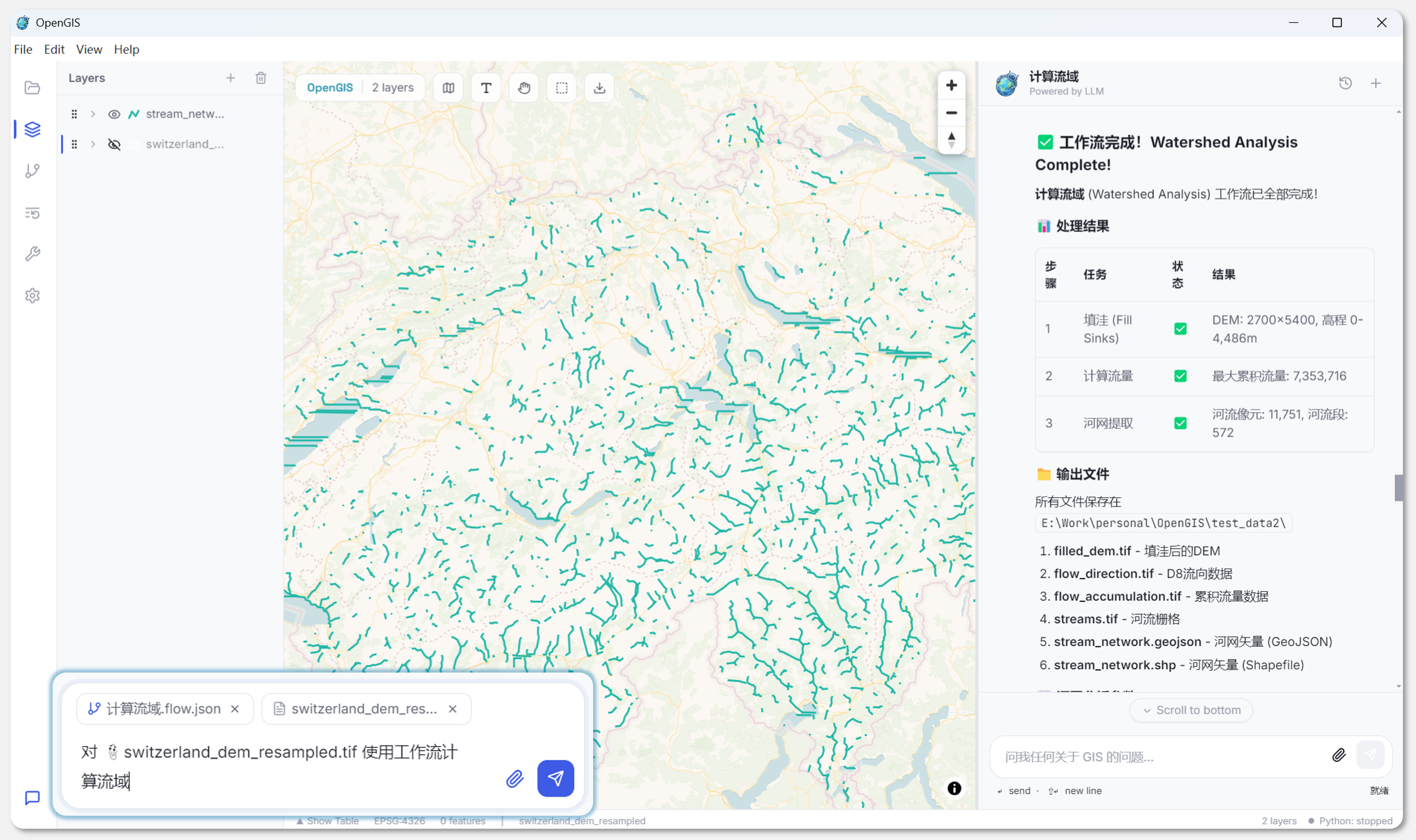
近一个月没有更新了,罪过罪过,五一歇了几天后,回来就接了个新需求,加上调休&唯一的休息日因事去了趟南京,这两个礼拜就没歇过。终于趁着周末,把节前刚开始的一个项目工作总结一下。
该项目OpenGIS旨在开发一个Agent驱动的GIS客户端,目前完成了基本框架,已可以完成一些基础的需求,后续还将接入qgis、osm等,但是现在太忙了,估计要搁置一阵子。
项目仓库:https://github.com/ATFfang/OpenGIS.git
项目概览
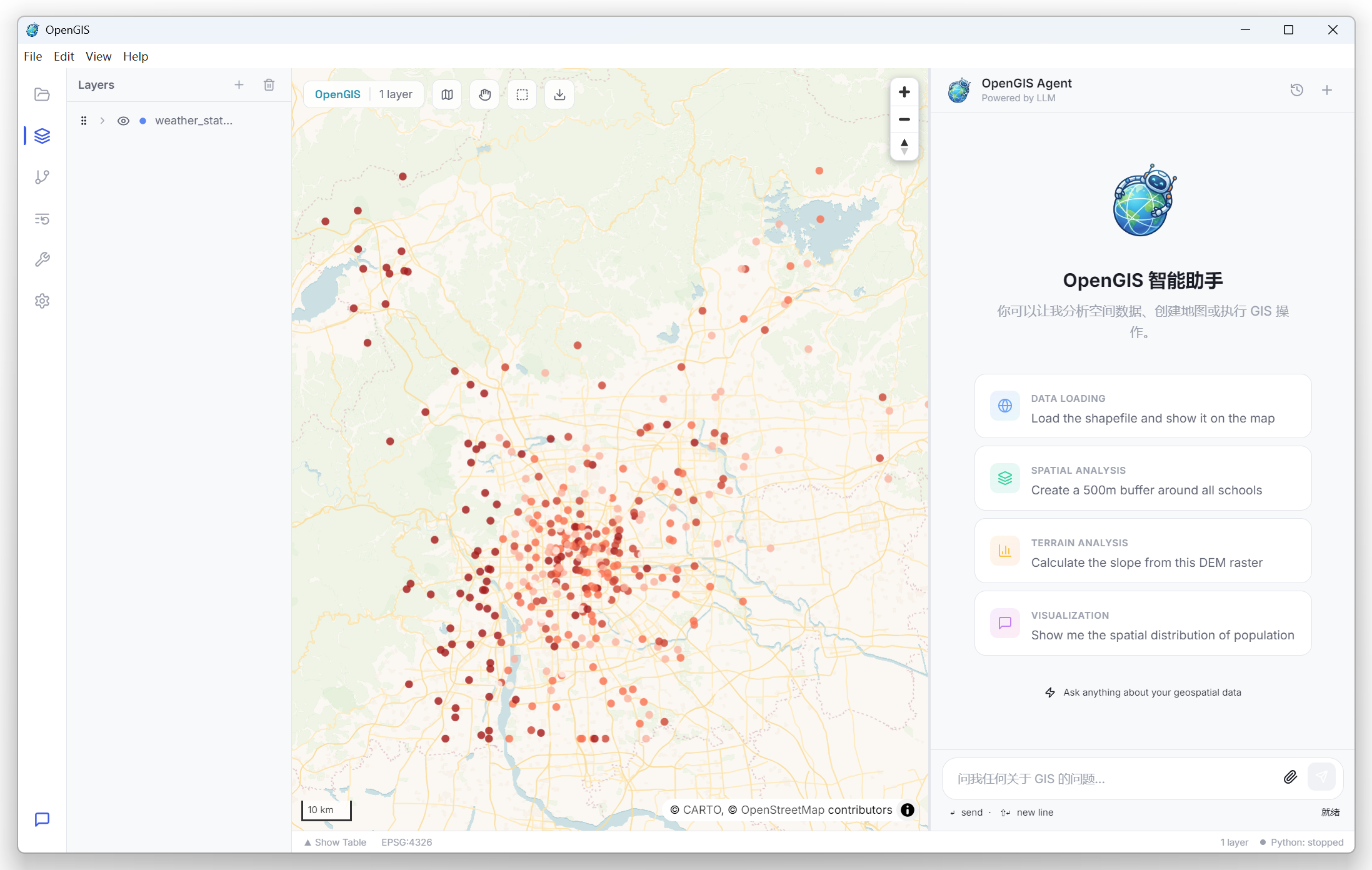
OpenGIS 的核心命题是:让 GIS 分析像聊天一样简单。用户在右侧 Chat 面板输入自然语言,Agent 引擎理解意图、生成 Python 代码、在沙箱中执行、将结果渲染到地图和数据面板上。整个过程是流式的,用户可以实时看到 LLM 的思考过程、代码生成、执行结果,就像在和一个 GIS 专家对话。
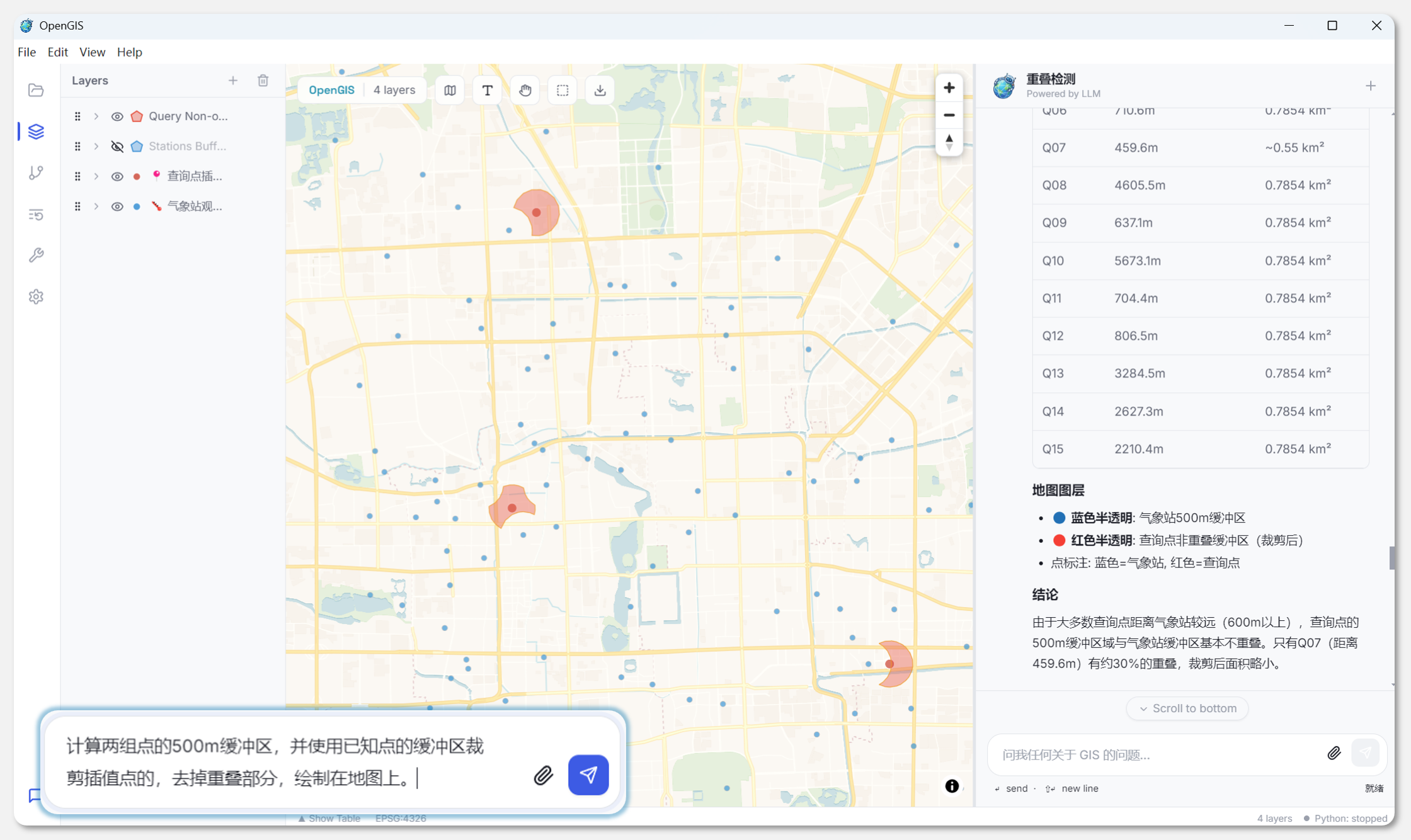
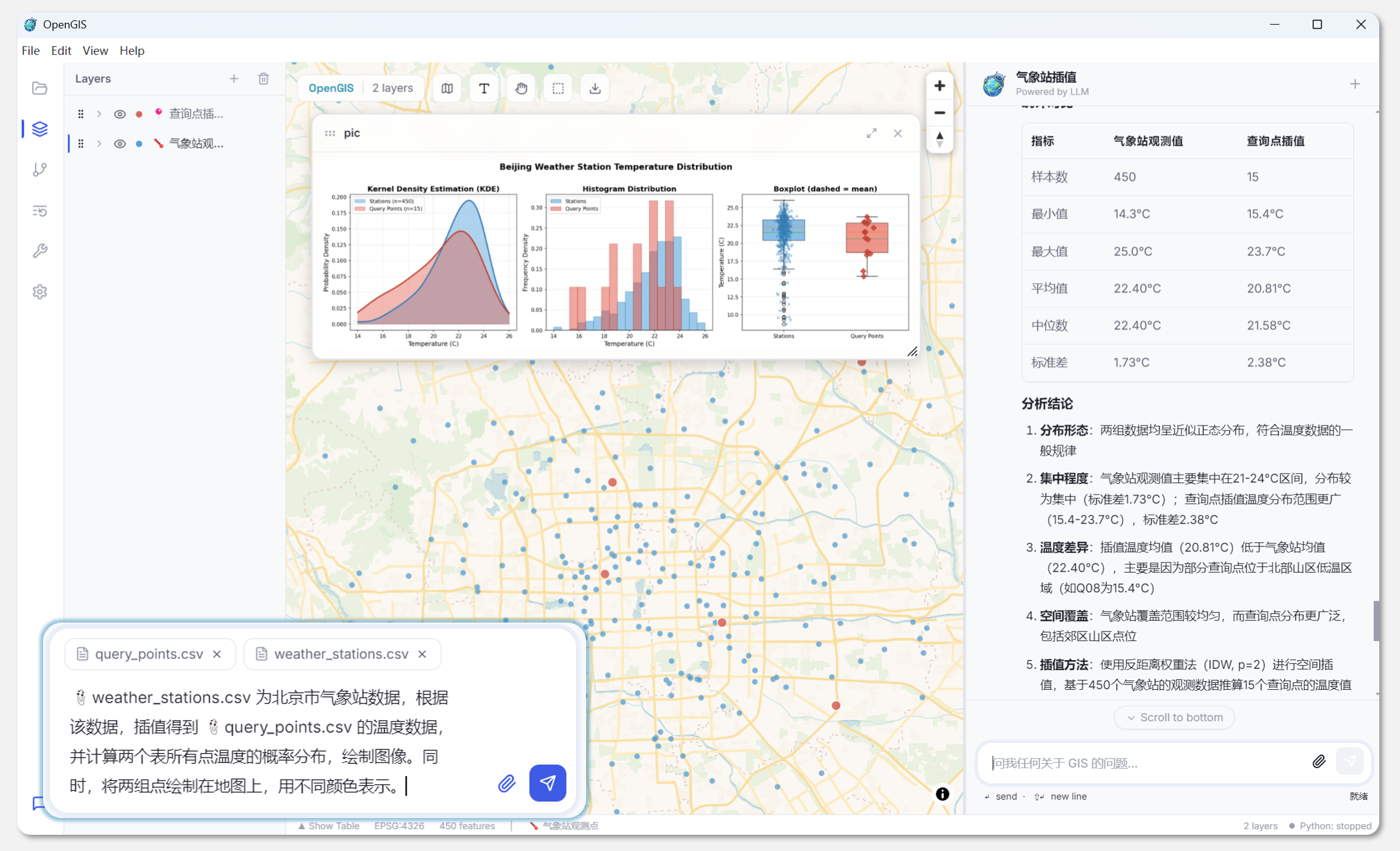
项目的技术栈选型如下。
| 层 | 技术选型 | 理由 |
|---|---|---|
| 桌面壳 | Electron 30.x | 跨平台桌面 + 完整的 Node API(文件系统、子进程) |
| 前端 UI | React 18 + TypeScript 5 | 组件化 + 类型安全 |
| 地图渲染 | MapLibre GL JS 4.x | 开源 WebGL 地图引擎,支持自定义样式和矢量瓦片 |
| 状态管理 | Zustand 4.x | 轻量、无 boilerplate、天然支持选择器订阅 |
| 后端 | Python 3.11+ / FastAPI / uvicorn | 异步高性能 + Python 生态(GeoPandas、Rasterio 等) |
| LLM 适配 | litellm | 一个库统一 OpenAI / Anthropic / DeepSeek 等 20+ provider |
| GIS 内核 | GDAL / GeoPandas / Rasterio / Fiona / Shapely / pyproj | 地理空间 IO 和计算的事实标准 |
| 通信 | WebSocket + JSON-RPC 2.0 | 双向、低延迟、结构化 |
进程模型
进程拓扑
OpenGIS 不单单是一个 Electron 应用,而是一个 Electron + Python Sidecar + N 个沙箱子进程 的复合系统。整体是 2 + N 的进程拓扑:
1 | Electron Main (Node.js) |
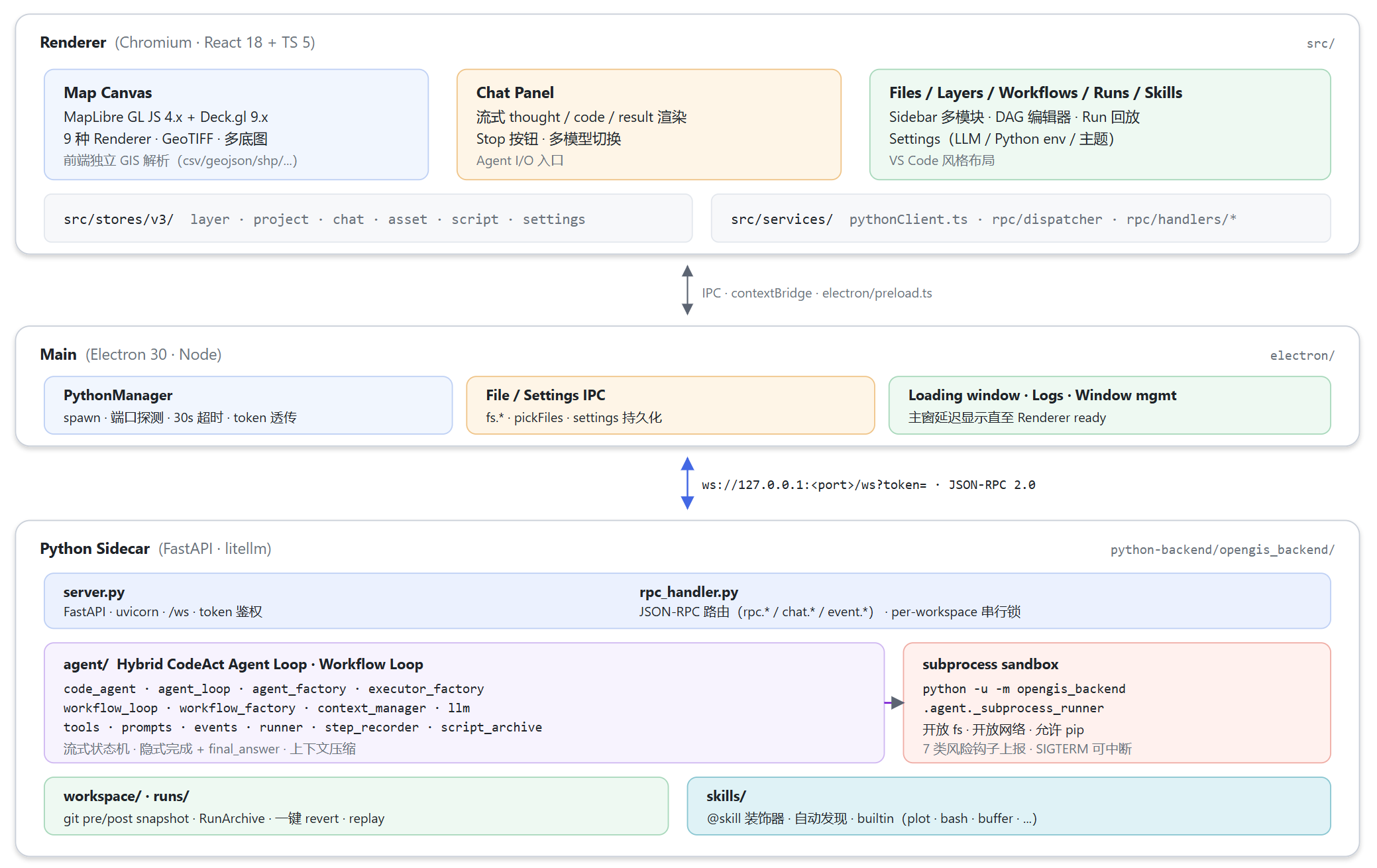
各层职责划分:
| 层 | 进程 | 主要职责 | 关键源文件 |
|---|---|---|---|
| Renderer | Chromium / React | UI、地图、Zustand Store、反向 RPC 处理 | src/features/、src/stores/、src/services/rpc/ |
| Main | Electron + Node | 窗口、文件 IO、设置持久化、Python 生命周期管理 | electron/main.ts、electron/ipc/pythonManager.ts |
| Sidecar | Python + FastAPI | JSON-RPC 路由、Agent / Workflow 引擎、Skill 系统 | python-backend/opengis_backend/server.py、agent/ |
| Sandbox | Python (per-run) | 真正 exec LLM 写出来的代码 | agent/_subprocess_runner.py |
在 Python 环境方面,项目使用自带 .venv,通过CI 预构建 .venv打进 extraResources,用户不需要配置。
Electron IPC 与 contextBridge 安全模型
Renderer 进程(React)不能直接访问 Node.js API,所有能力通过 electron/preload.ts 的 contextBridge 代理:
1 | const electronAPI = { |
onPythonStatusChanged 和 onPythonWsToken 返回 unsubscribe 函数(cleanup pattern),避免 React effect 卸载后残留监听器。Renderer 侧的 window.electronAPI 类型通过 ElectronAPI TypeScript 接口导出,保证类型安全。
通信层:WebSocket 上的双向 JSON-RPC
传统 Electron + Python 方案常用 REST API,但 OpenGIS 需要双向通信,比如说:
- Renderer → Python:用户发消息、请求执行脚本、查询 run 记录等
- Python → Renderer:Agent 执行过程中让前端把这数据加载进 layerStore、显示一张 matplotlib 图、弹一个确认对话框等
如果用 REST,Python → Renderer 方向需要额外使用 WebSocket 或 SSE,等于维护两条通信通道。JSON-RPC 2.0 over WebSocket 天然支持双向通信,即同一条 WebSocket 既承载正向请求,也承载反向请求。因此项目采用WebSocket 上的双向 JSON-RPC,下面详细讲一下通信层的结构。
通信契约
Python 端注册的方法表:
1 | self._method_handlers = { |
前端消息路由
通信协议按方法前缀分三个通道:
1 | // src/types/protocol.ts |
就是说 Python 推过来一条通知消息,前端同时推送给两个地方各处理一份,这两个地方职责不同:
- dispatcher 负责
rpc.ui.map.*,处理比如 Python 修改图层的请求 - notificationHandlers 负责
chat.*,处理 Chat相关请求,比如流式对话 - 此外,
event.预留给单向状态变更,目前暂未使用
反向 RPC:Python 远程指挥前端
Python 不持有图层数据副本,所有事实都在 Renderer 的 Zustand Store 里。当 Agent 在子进程里执行 display(gdf) 时,实际的调用链是:
1 | 子进程 exec("display(gdf)") |
Agent 引擎:Hybrid CodeAct Agent Loop
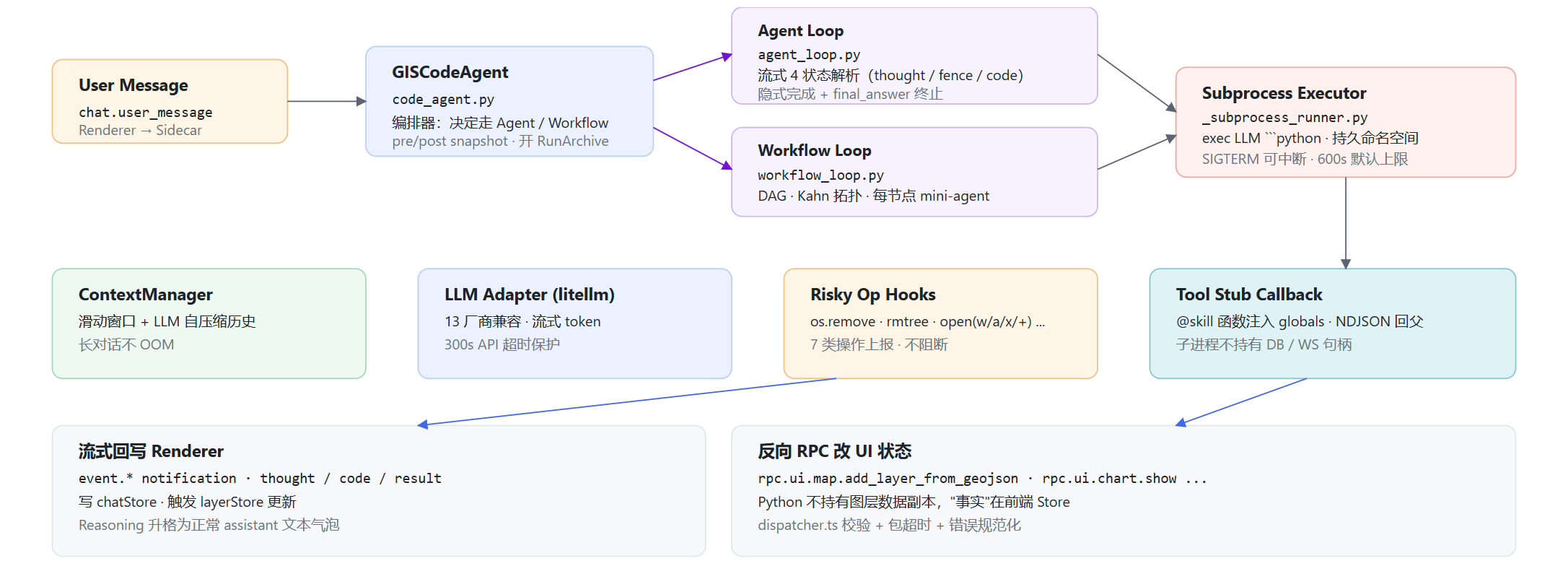
为什么是 CodeAct
在做 Agent Loop的时候,注意到主流的范式包括两条路线:
- JSON tool call(OpenAI function calling):LLM 输出结构化 JSON,框架按 schema 路由到工具
- CodeAct(Wang et al. 2024):LLM 输出 Python 代码块,框架直接 exec
GIS 场景里,预定义 tool 的 schema 数量永远追不上长尾需求,需求多乱复杂,无法一一封装为 function call 或者 skills,因此,我们更愿意选择CodeAct框架,只把和图层交互封装为Python父进程级别的skill,子进程通过函数唤起,连 final_answer 也是子进程里的一个 stub 函数。
状态流式解析器
LLM 一边吐 token、UI 就要一边把 thought 和 code 分开渲染。StreamingParser 是个状态机,有四个状态:
1 | thought ──`──► in_fence_open ──```python\n──► code ──`──► in_fence_close ──```\n──► thought |
StreamingParser 的内部实现
StreamingParser 是一个 @dataclass,核心字段包括:
1 |
|
每个状态都有独立的处理函数:
_step_thought():扫描到第一个反引号之前的所有字符都作为 thought 输出。找到反引号后进入in_fence_open状态。_step_fence_open():检查缓冲区是否是```python、```py、```的前缀。如果缓冲区超过_MAX_HOLD(16 个字符),放弃匹配,把第一个字符吐回 thought(这处理了行内反引号如```bash的情况)。_step_code():扫描到反引号进入 fence close 状态。_step_fence_close():如果缓冲区匹配```,关闭 fence 并吞掉后面的换行符。如果不匹配且超过 16 个字符,把缓冲区吐回 code。
流结束处理(finish()):如果流结束时代码块未关闭(半截 fence),剩余内容当作 thought 输出。这让 LLM 即使在 stream 中断时也能优雅降级。
回调驱动的 UI 更新
四个回调 on_thought_delta、on_code_start、on_code_delta、on_code_end 通过闭包捕获 reasoning_round_seq 等状态,即时推送给前端。用户看到的是:先出现一段思考文本,然后代码块逐字打字出来,似乎现在主流的Agent客户端或插件都有类似的实现模式,不过OpenGIS的优雅美观程度还需要继续优化。
一次循环的流程
AgentLoop.run() 是个同步函数(被 asyncio.to_thread 包起来跑),其一次完整循环如下:
- 构建 messages:
context.build_messages(self.system_prompt)拼出本轮 messages(含历史 + 系统 prompt + 必要时压缩过的摘要) - 调 LLM:使用
self.llm_call(messages, on_delta=parser.feed),token 流过StreamingParser.feed()即时分发。如果 provider 不支持 streaming,fallback 到非流式调用(TypeError时捕获降级) - 提取代码:流结束
parser.finish(),再用_CODE_FENCE_REregex 兜底提取 code(流式解析失败时仍能 fallback)。还支持<code>...</code>标签格式(_CODE_TAG_RE) - 没代码 = 隐式完成:LLM 自己决定停下来纯文本回复,触发
on_reasoning_promote,把"思考气泡"升级为"正式回答气泡",循环退出 - 有代码 = 一步动作:
executor_call(code_block)把代码扔给子进程跑,拿回CodeExecResult(output, logs, error, is_final_answer) - 显式完成:
is_final_answer=True(子进程里调了final_answer(...))→ 退出 - 否则继续:把
(code, output)写回 context,should_compress()检查是否需要压缩历史,循环到第 1 步
终止条件
终止条件包括隐式完成 / 显式 final_answer / 达到步数上限(默认 DEFAULT_MAX_ITERATIONS=10)。触顶后调用 _generate_max_steps_summary(),让 LLM 写一段总结。
上下文压缩
压缩触发条件
ContextManager.should_compress() 监控两个指标:
1 | def should_compress(self) -> bool: |
两层压缩策略
压缩分两层(参考 Claude Code 的分层策略):
Layer 1: _prune_outputs():纯机械操作,把旧 tool 结果替换为骨架占位符:
1 | "[Step {step} pruned] ({status}) -- code: `{first_line}` -- body removed to save tokens" |
保护规则:最近 keep_recent=8 条消息不动;包含 skill( 关键字的消息不动(因为 layer_id / file_path / snapshot_id 这种东西删掉后续就找不回来了);token 数低于 safe_buffer_tokens=40,000 时不动。
Layer 2: LLM 自总结,让 LLM 把过去 N 步压缩成结构化摘要:
1 | ## Goal |
摘要支持中英文自适应。使用 anchored merge,把旧摘要包在 <previous-summary> 块里让 LLM 合并,避免无限增长。
压缩后的文件重读
压缩有一个经典问题:LLM 之前 read 过文件内容,压缩后内容没了。ContextManager.track_file_edit() 用 LRU 维护最近编辑的 5 个文件,压缩后自动重新注入:
1 | def _build_reread_message(self) -> dict: |
LLM 配置变更检测
rpc_handler.py 中,LLM 配置变更不是每次都重建 Agent,而是用 MD5 hash 比对:
1 | config_hash = hashlib.md5( |
API key 本身做了一层 MD5 hash 再进 config hash,确保配置变更可检测但 key 不落日志。
子进程沙箱:开放、可观察、可中断、可回滚
进程级隔离:父子双向 NDJSON
sidecar 主进程不直接 exec() LLM 写的代码。每个 agent run 都 fork 一个 python -u -m opengis_backend.agent._subprocess_runner 子进程,父子通过 stdin/stdout 跑一套双向 NDJSON 协议(每行一个 JSON 对象):
1 | 父 → 子 (stdin) 子 → 父 (stdout) |
-u flag 关掉 Python 的 stdout buffering,确保 print() 输出实时到达。每行一个 JSON 对象(NDJSON),避免了 JSON 数组需要整体解析的问题,子进程可以一边计算一边输出,父进程逐行读取。
这样几个好处:
- 子进程崩溃 ≠ sidecar 崩溃,LLM 写一段死循环 /
os._exit(1)/MemoryError都只杀子进程 - 子进程持久状态,同一个 run 内多次 exec 共用 globals,
gdf = gpd.read_file(...)然后下一个 cell 直接print(gdf.head())像 Jupyter 一样工作 - 资源边界清晰,子进程不持有 WebSocket、数据库句柄、SkillRegistry,纯当"代码运行宿主"
Tool stub:远程回调而非真函数
子进程里的 final_answer(...) 和每个 @skill 装饰过的函数都不是真函数,而是 _make_tool_stub() 生成的远程调用桩:
1 | def _make_tool_stub(name: str): |
子进程发 tool_call → 父进程收到后真正执行(持有 SkillContext、能调反向 RPC) → 回 tool_result。而final_answer 比较特殊。stub 里不是真的发 NDJSON,而是直接 raise _FinalAnswer(value):
1 | class _FinalAnswer(BaseException): |
BaseException(而非 Exception)的设计是为了绕过 LLM 可能写的 except Exception: pass 之类的安全网,无论用户代码里怎么 try/except,_FinalAnswer 都能 unwind 出 exec(),被父进程捕获并翻译成 is_final_answer=True。
save_plot 的本地实现
save_plot 是唯一的例外——它不在子进程里用 stub,而是用 _make_local_save_plot() 在子进程本地实现:
1 | def _make_local_save_plot(cwd: str): |
这是因为 matplotlib figure 不能序列化为 JSON 跨进程传,必须在持有 figure 的进程里直接 savefig,然后把文件路径传回父进程。
全局命名空间管理
_build_namespace(tool_names) 构建子进程的全局命名空间(globals dict)。同一个 run 内的所有 exec 共享这个 namespace,所以:
1 | # Step 1 |
像 Jupyter notebook 一样工作。_run_exec(code, namespace) 的执行逻辑:
1 | def _run_exec(code: str, namespace: dict): |
stdout 通过 _TeeStdout 捕获,每次 print() 都同时写入内部 buffer 和 emit {"kind": "stdout", "text": ...},实现实时输出。finally 块恢复 sys.stdout。
风险Hook:观察不阻断
_install_risky_op_hooks() monkey-patch 7 类写效果操作,每次调用都发一条 risky_op 给父进程,最终落进 meta.json.risky_ops:
| 类别 | 被 patch 的符号 |
|---|---|
| 删除 | os.remove · os.unlink · shutil.rmtree · pathlib.Path.unlink |
| 写文本 / 字节 | pathlib.Path.write_text · pathlib.Path.write_bytes |
| 打开写模式 | builtins.open(mode in {"w","a","x","+"}) |
目前的架构是只观察、不阻断,如果 LLM 想 rm -rf workspace/* ,在当前的逻辑中不阻止,但每条都留痕,加上 git snapshot 即可一键还原。builtins.open 的 patch 检查 mode 参数,:只在 mode 包含 w、a、x、+ 时才上报,读模式(r、rb)不触发,错误在 telemetry 中被静默吞掉,绝不因为 hook 崩溃影响代码执行。
单 run 预算与并发锁
- per-run timeout:
SubprocessExecutorConfig.exec_timeout,默认 600s(DEFAULT_EXEC_TIMEOUT),最大 3600s(MAX_EXEC_TIMEOUT),最小 1s(MIN_EXEC_TIMEOUT) - per-workspace 串行锁:
rpc_handler.py里_workspace_locks: dict[str, str](workspace_path → owner run_id),新请求若发现该 workspace 已有活跃 run,直接返回{"status": "busy", "owner_run_id": ...}而不是排队,避免 cwd / archive 目录竞态 - 真杀进程树:cancel 走
executor.interrupt()→executor.cleanup(),Windows 走CTRL_BREAK_EVENT+taskkill /F /T /PID,POSIX 走SIGTERM → 5s → SIGKILL,确保子进程的子进程(pip installfork 出的 build worker 之类)也一起清掉
Agent Cancel 的四步流程
_handle_agent_cancel 需要完成四步有序的清理:
1 | ① agent._current_loop.interrupt() → 设 _interrupted 标志位 |
Workspace + Run:事中可中断 + 事后可回滚
WorkspaceManager:双 SHA snapshot
每个 agent run 的开头和结尾,WorkspaceManager 各打一次 git snapshot:
1 | run 开始 ──► pre_sha = git commit --allow-empty -m "opengis: pre {run_id}" |
两个 SHA 写进 .opengis/runs/<run_id>/meta.json,如果 workspace 还不是 git 仓库,首次 run 时懒初始化(git init + 一次 baseline commit)。
WorkspaceManager 初始化细节
1 | def ensure_initialized(self, workspace: Path) -> WorkspaceInfo: |
.gitignore 用围栏标记(# >>> opengis <<< / # <<< opengis >>>)实现幂等追加,不会重复写入:
1 | .opengis/runs/ |
snapshot() 方法的实现:
1 | def snapshot(self, workspace, *, run_id: str, label: str) -> str: |
即使 workspace 没有任何变化,也创建 commit,保证 pre_sha 和 post_sha 始终有效。git user 设为 OpenGIS / opengis@local,不污染用户的全局 git 配置。
RunArchive:每个 run 单独归档
每个 run 在 .opengis/runs/<run_id>/ 下产出:
1 | meta.json # prompt / pre_sha / post_sha / status / step_count / risky_ops / 时间戳 |
steps.jsonl 的流式写入
用 JSONL(每行一个 JSON)而非 JSON 数组,是因为 run 进行中就需要追加写入。崩溃了也不丢已写入的步骤:
1 | def record_step(self, step, code, output, error, script_path=None): |
风险操作归档
record_risky_op() 追加到 meta.json["risky_ops"] 数组,上限 1000 条。
1 | def record_risky_op(self, entry: dict): |
一键 revert
rpc.workspace.revert_run 走 git reset --hard <pre_sha>:
1 | async def _handle_workspace_revert_run(self, params): |
reset_hard 走 git reset --hard,不动 untracked 文件,因此,系统通过事中(Stop 按钮真杀进程树)+ 事后(revert 一键回滚),构建了开放沙箱模型下的完整双重安全网。
Skill 系统
skills/ 提供三件套:@skill 装饰器 + SkillRegistry(启动时 await discover_and_load() 自动扫描)+ SkillContext(持有 notify_fn / conversation_id / meta)。
@skill 装饰器
1 | def skill(name, display_name=None, description="", category="general", |
needs_context=True 时,装饰器通过 contextvars.ContextVar 自动注入 SkillContext,Skill 函数签名里不用显式传 context。
SkillContext 的 ContextVar 传播
1 | _skill_context_var: contextvars.ContextVar = contextvars.ContextVar("opengis_skill_context") |
用 contextvars.ContextVar 而非全局变量,是因为 ContextVar 天然支持 asyncio 任务隔离,并发的两个 skill 调用各自持有独立的 context,不会互相覆盖。
SkillRegistry 的自动发现
1 | class SkillRegistry: |
新 Skill 只需把 .py 放进 skills/builtin/,import 时 @skill 自动注册。
内置 Skills
| Skill | 作用 | 是否反向 RPC |
|---|---|---|
bash |
受控的 shell 调用(不在子进程里直接 subprocess.run,走 skill 拿到统一日志) |
否 |
buffer |
矢量 buffer 几何运算 | 否(纯 Python) |
csv_to_geojson |
CSV → GeoJSON 转换 | 否 |
display |
把数据 / 图层显示到 UI(add_layer / remove_layer / fly_to / set_basemap 等) |
是 |
read_file / write_file / edit_file |
文件 IO | 否 |
glob / grep |
工作区搜索 | 否 |
plot |
matplotlib 图像生成并回传前端 | 是 |
display skill 的图层生命周期
display skill 维护一个进程内 _LAYER_INDEX 字典,记录每个 layer_id 的 bbox、feature_count、geometry_type,供后续 zoom_to_layer 等操作使用:
1 | _LAYER_INDEX: dict[str, dict] = {} |
plot skill 的 figure 回传
save_plot 把 plt.gcf() 保存到 <workspace>/assets/plots/,然后通过反向 RPC rpc.ui.chat.show_image 让前端渲染:
1 |
|
Skill 参数的 Schema 系统
每个 Skill 参数通过 SkillParam 定义类型约束:
1 | class ParamType(str, Enum): |
to_json_schema() 生成 JSON Schema,to_openai_schema() 生成 OpenAI function-calling 格式,这意味着即使走 CodeAct 路线,Skill 的签名信息也能暴露给 LLM 作为工具描述。
Workflow Loop:DAG 驱动的多步 Agent
agent/workflow_loop.py 把线性聊天 Agent扩展成按 DAG 编排的多步 Agent,前端 WorkflowEditorView 编辑生成 .flow.json,附带到聊天里就自动切换执行模式。
数据结构
1 |
|
执行管线
- 解析:
WorkflowDocument.from_json(raw)把.flow.json解析成 nodes + edges - 拓扑:
topological_sort()走 Kahn 算法,构建邻接表和入度表,零入度节点入队,BFS 处理,遇到环抛ValueError,即拒绝执行而不是悄悄漏跑节点。 - 节点提示:
build_step_prompt()给每个节点造一段聚焦提示,结构是"Workflow Step i/N: <title>" + 用户原始诉求 + 节点描述 + 前驱节点输出(截断到 2000 字符)+ 指令 - 节点执行:
_execute_node()跑一个 mini-agent loop(与主 loop 同款 Hybrid CodeAct) - 结果传递:上游节点的 output 被收集进
predecessor_outputs,在下游节点的 prompt 里出现
execute_node 的 mini agent loop
每个节点是一个多步 mini loop,包括max_retries * 3 次迭代,错误预算 max_retries(默认 3):
1 | async def _execute_node(self, node, step_prompt, executor_call, llm_call): |
与主 AgentLoop 的关键区别:
- 没有 StreamingParser(节点内部不需要流式渲染)
- 没有 context compression(节点级上下文通常不大)
- 错误反馈直接注入 prompt(简单粗暴但有效)
- 每个节点的 LLM 上下文独立,不共享历史
_generate_workflow_summary() 收集所有节点输出(每节点截断 500 字符),让 LLM 生成用户友好的总结。显式指令 “NOT to invent file names”,以防止 LLM 幻觉出不存在的文件路径,下面是一个使用的例子: